Home Renovation Tracker & ROI — Know the return before
you renovate.

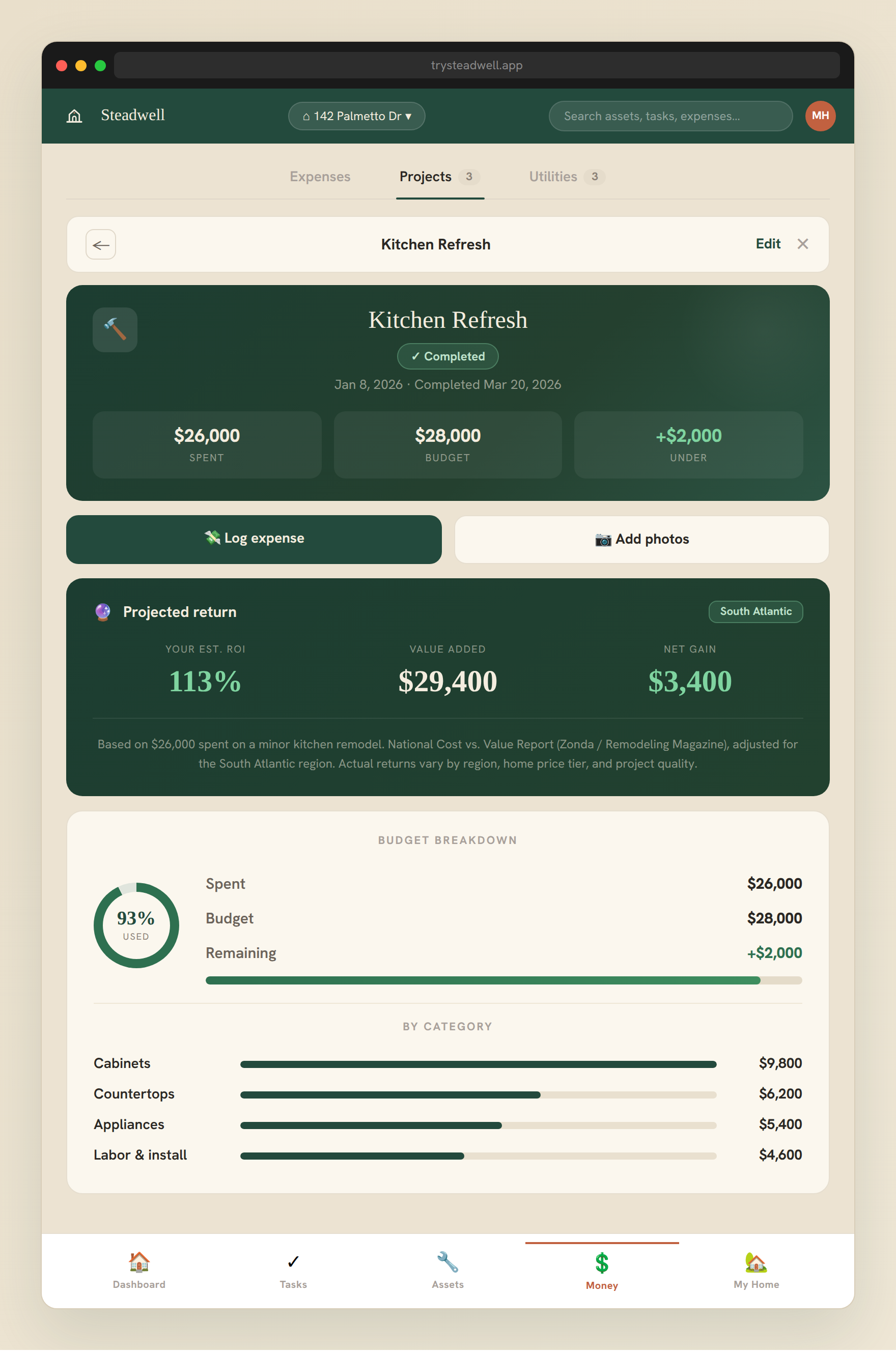
Track every home improvement project with budgets, timelines, and contractor details. The ROI calculator estimates what each project adds to your home's resale value, then AI reviews your before and after photos to adjust it for the work you actually did.

Projects free · ROI calculator and AI review on Plus
Steadwell project ROI calculator showing a kitchen remodel with 113% return and $29,400 value added

What you track for each project

From a $200 faucet replacement to a $50,000 kitchen remodel.

📋
Project details
✓Project name & description
✓Status (planning/active/complete)
✓Start and end dates
✓Budget vs. actual cost
✓Contractor name
✓Notes and updates
📸
Documentation
✓Before and after photos
✓Contractor invoices
✓Permit numbers
✓Material receipts
✓Warranty on work done
✓Inspection reports
📊
ROI calculator (Plus)
✓Project category selection
✓Cost vs. Value report data
✓DIY vs. contractor toggle
✓Estimated value added
✓Percentage return on cost
✓Regional market-specific data

How the ROI calculator works

Based on the annual Cost vs. Value Report — the industry standard for renovation ROI.

01
Log your project
Add the project type, total cost, and whether you did it yourself or hired a contractor.
02
Select your project category
Choose from kitchen remodel, bathroom addition, deck, roof replacement, window replacement, and more.
03
Get your ROI
We apply the Cost vs. Value report data for your region to calculate the estimated resale value added and your return on investment.
04
Make smarter decisions
Before starting a project, see which renovations return the most in your area — so you spend where it matters most.

When the work is done, AI sharpens the estimate

The Cost vs. Value estimate is an average. Add your before and after photos and AI adjusts it for the project you actually did.

1
Add before and after photos
Several of each, from your camera or photo library. You can run a review before the project is marked done.
2
AI describes what changed
It compares condition and finish level, checks whether the result matches the scope you logged, and flags visible workmanship problems.
3
A fixed formula sets the adjustment
The AI reports what it sees. A fixed formula turns that into a change to your estimate, limited to between −30% and +25%.
4
You decide
Apply it, or keep the national estimate. Every review and your decision are saved in your account.

Plus includes 3 AI project reviews a month and Pro includes 15. Photos are saved privately in your account and analyzed with AI, and Steadwell doesn't use them to train AI. See our Privacy Policy. Reviews are estimates, not appraisals.

Common questions

Is project tracking free?
Yes, project tracking is free on all plans. The ROI calculator and the AI project review require Plus or Pro.
What is the Cost vs. Value Report?
The Cost vs. Value Report is an annual study by Remodeling Magazine that tracks the average cost and resale value of common home improvement projects across US markets.
How accurate is the ROI estimate?
ROI estimates are based on regional averages from the Cost vs. Value Report. Actual returns vary based on your specific home, neighborhood, and market conditions.
Can I track multiple projects at once?
Yes — track as many projects as you like simultaneously, each with their own budget, timeline, and contractor.
How does the AI project review work?
You add before and after photos to a project. AI describes what changed, including condition, finish level, and whether the result matches the scope you logged. A fixed formula turns that into an adjustment to your ROI estimate, limited to between −30% and +25%. You choose whether to apply it.
Is the AI review an appraisal?
No. It is an estimate that adjusts a national average using what the photos show. It does not replace a licensed appraiser, and actual resale value depends on your home, neighborhood, and market.
Who sees my project photos?
Photos are saved privately in your account and analyzed with AI. Steadwell doesn’t use them to train AI. Details are in our Privacy Policy.
How many AI project reviews do I get?
Plus includes 3 a month and Pro includes 15. A review that fails, or one where the photos are too unclear to read, doesn’t count against your total.
Free estimate — no account required

What will your project return?

Pick a project type below and see the typical cost range and resale value return — then sign up to run the full calculator with your own numbers.

Select a project above to see the estimate

Based on national Cost vs. Value Report averages. Actual returns vary by region and project quality.

Renovate smarter.

Track every project, know the ROI, and build a complete renovation history for your home.

Start for free →
Free to start · No credit card required